“Detailed Basics Course for beginners!”
Data Annotation Basics
Video Annotation BASICS
Follow a moving object frame by frame and name the action. This is how video AI learns what happening looks like.
Self-Paced
Always Open
Optional Certificate
Part of the Data Annotation Basics programme.
Self-Paced · Always Open
Free
Optional certificate:
Learn at your own pace, with no fixed schedule
Structured self-paced course modules
Theory lessons, examples, and knowledge checks
Optional paid certificate (after passing the assessment)
Overview
Start your Video Annotation journey.
Video labeling is image annotation with a twist: time.
You’re not just answering “what’s in this frame?” — you’re tracking how things change across frames, when an event starts and ends, and which object in frame 30 is the same one from frame 10. The added dimension is what makes video work distinct, and it’s why autonomous driving, sports analytics, and video–language models all depend on this kind of data.
This Basics course covers the conventions: video classification, temporal segmentation, object tracking across frames, and activity annotation. Self-paced theory and knowledge checks; no fixed schedule.
Part of the Data Annotation Basics learning track. Optional verifiable certificate available for a small fee.
What You Get
What's included in your training
Structured Learning Modules
Learn at your own pace through structured modules on the DeeLab Academy learning platform.
Self-Paced Schedule
No fixed schedule. Start when you want, finish at your own pace.
Knowledge Checks
Worked examples and per-unit practice quizzes with instant feedback, plus a final knowledge assessment on the e-learning platform (80% to pass).
Optional Certificate
Optional verifiable certificate available for a small fee after you pass the final assessment.
Outline
What you'll learn
-
Video Classification
How video classification assigns category labels based on overall clip content.
-
Temporal Segmentation
What temporal segmentation marks: when events and actions start and end.
-
Object Tracking Across Frames
How object identity stays consistent as objects move through a video.
-
Activity / Event Annotation
What activity and event annotation describes about people and objects in motion.
-
Spotting Correct vs Incorrect Video Annotations
How to recognise the difference between a clean annotation and a sloppy one.
Part of the Data Annotation Basics (DAB) programme.
Success Stories
What our trainees say
Unedited feedback from graduates who completed this course.
Got Questions?
Frequently Asked Questions
Everything you need to know about this course.
It's designed for beginners. No prior AI knowledge or coding required. Video labeling assumes some intuition about image annotation, but you don't need to have completed Image Annotation Basics first; this course covers the foundations from scratch.
The added dimension is time. Instead of answering 'what's in this frame?', you're answering 'what's in this frame, and what happens across frames'. You track objects as they move, mark when events start and end, and keep identity consistent so the model knows object #3 in frame 30 is the same one from frame 10. That temporal consistency is the skill that separates video annotators from image ones.
Self-paced theory lessons and an online knowledge assessment on the e-learning platform. The Basics tier is focused on understanding the conventions of video annotation: classification, temporal segmentation, object tracking across frames, and activity annotation. There is no hands-on work with annotation tools in this course; that comes in the paid Video Labeling Essentials course.
The course is free, but the certificate is not — claiming it is optional and costs a small fee. It's verifiable proof that you've completed the self-paced course and passed the online knowledge assessment. Useful as foundation evidence on a CV or LinkedIn profile. It does not mean you've been trained to production standards; the paid Video Labeling Essentials course is the hands-on path toward that. Essentials-level courses make up the Certified Data Annotator (CDA) programme.
Two natural directions from here. To broaden your foundation, the Data Annotation Basics (DAB) programme has free courses on image, audio, text, segmentation, and 3D point cloud, all at the same level as this one. To go deeper into video annotation specifically, the paid Video Labeling Essentials course is the next level up: online sessions with an industry trainer, access to the labeling tools used in production, ongoing support, and a graded final assessment. The Essentials-level courses make up the Certified Data Annotator (CDA) programme.
You have three months to complete the course, counted from the day you sign up. Within that window it is entirely self-paced and always open; your progress is saved automatically and you can return whenever suits you.
From the blog
Related articles
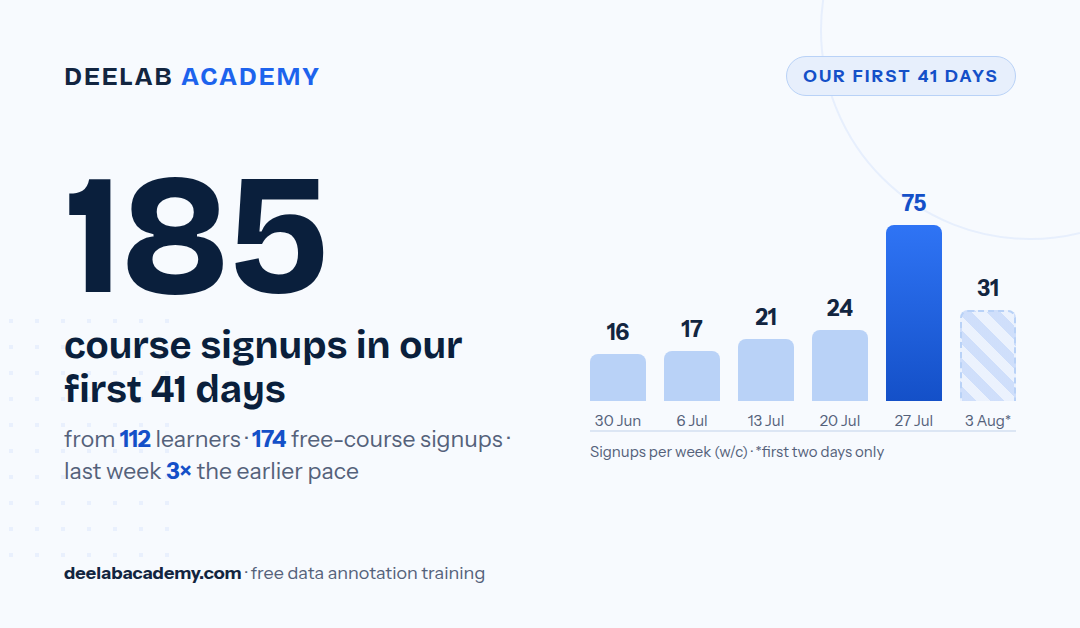
In its first 41 days, DeelabAcademy.com recorded 185 course signups from 112 learners, with weekly signups tripling in late July. Course ratings average 4.78/5 from 136 reviews. A summary of the first month: who signed up, what they took, and what they said.
5 min read · 05 Aug 2026
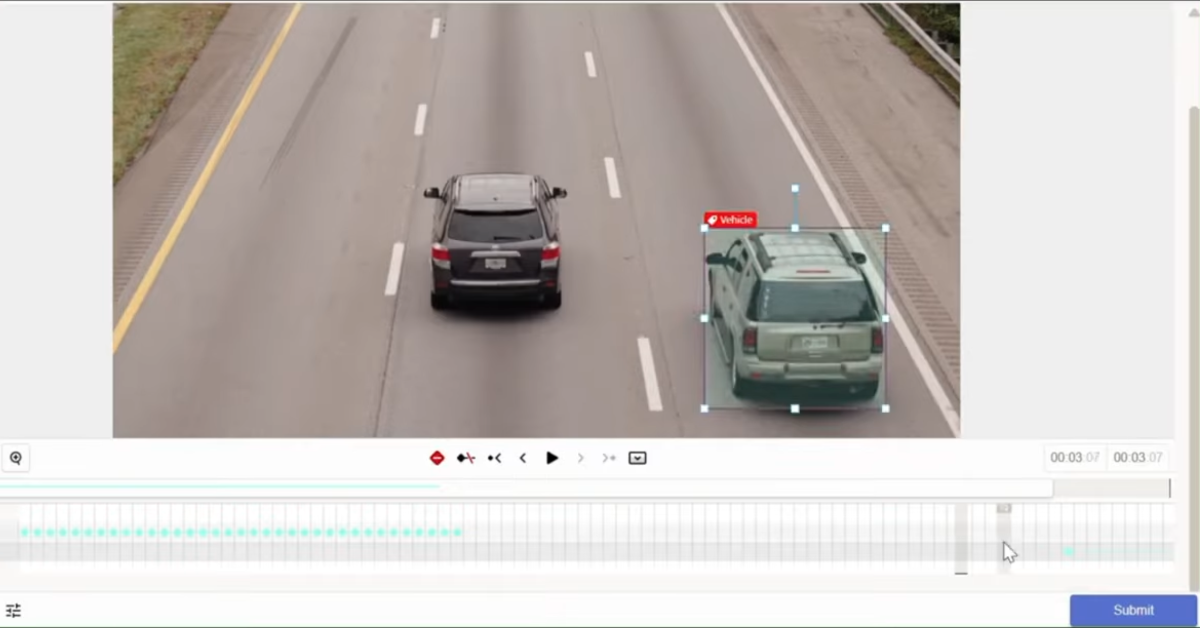
Video labeling teaches AI to track objects, mark event boundaries, and recognise actions across a timeline. It underpins autonomous vehicles, sports analytics, security systems, and quality control on production lines.
9 min read · 05 Jul 2026

Data Annotation Basics is DeeLab Academy's new free programme: six self-paced courses, one for each main type of annotation. Each teaches the principles of its discipline and is the no cost way to learn the field and find which type suits you.
10 min read · 20 Jun 2026
More on these topics
Related Programmes